
TimelineKeep track of the entire process in one place
Every accepted Offer goes onto the Timeline. If it has no date, it waits in the list of unscheduled Offers until you drag it to the right day.
When plans change, move the job to another day. Jobs that have exceeded estimates turn red on the Timeline and appear in the daily summary, so you can respond in time.
What you get
- Connected to staff Time Tracking
- Progress updates automatically
- Inspections and service contracts show up next to your projects
- Projects without an offer, such as internal work and billable hours, also appear on the timeline
How it works
Week or Month
The Timeline opens on today. The week view shows each job with dates and status, the month view shows long-term jobs in full, and you can browse a year back and a year ahead.
- Public holidays feature a red header with the name of the holiday, from New Year's Day and Easter to June 17th, Commerce Day, and Christmas.
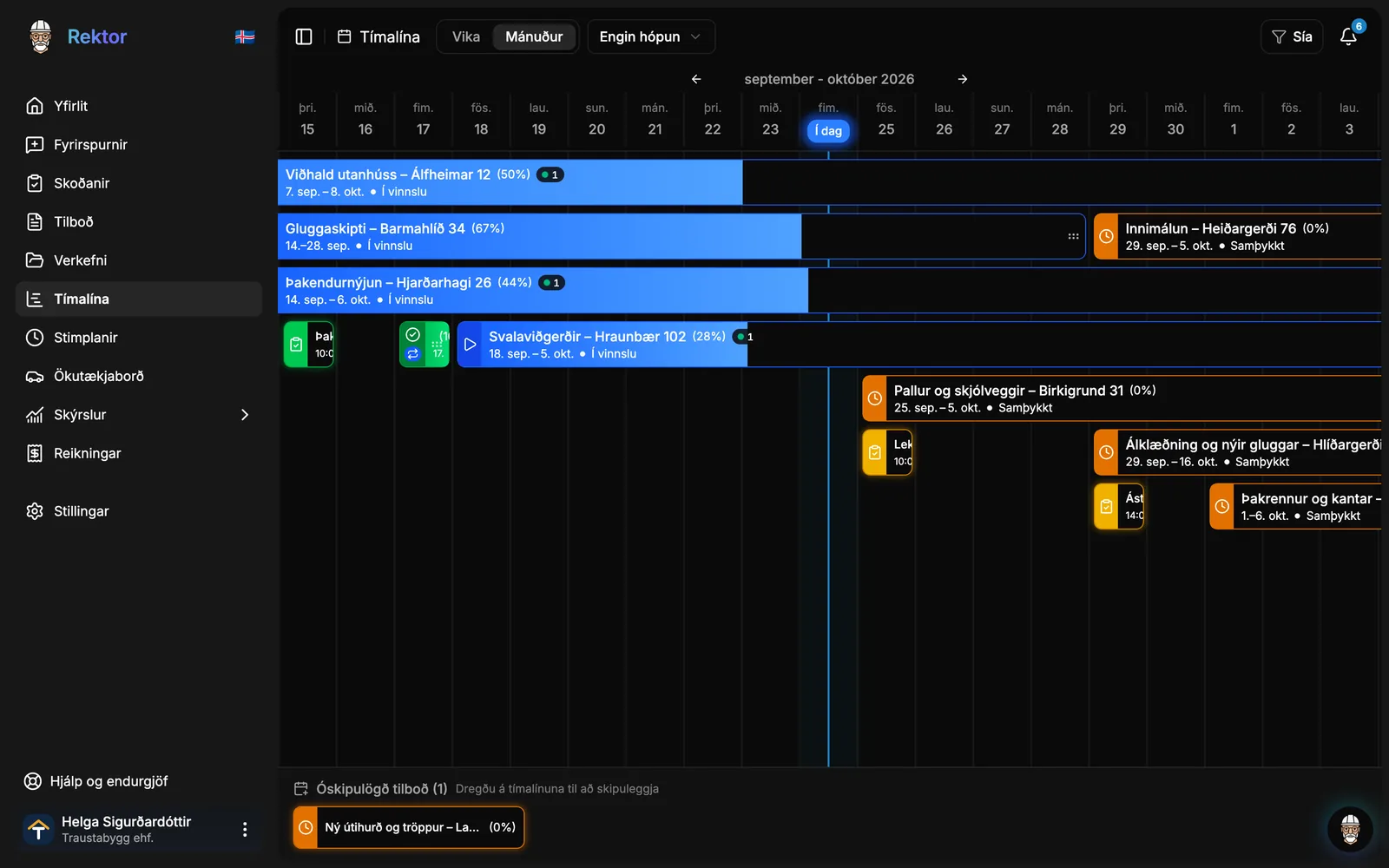
Drag to move or extend
Reschedule easily with your mouse. Before anything is saved, you can review the dates before and after the change and confirm.
- Drag a bar to a new date to move the project, or drag the right edge to extend or shorten it.
- Approved jobs with no date wait on the side until you drag them onto the Timeline.
- Rektor asks whether the customer should receive an email with the new dates.
Who is on which project
You can group projects by staff, crews, or partner companies, so you can see who is on which project.
- Put together crews, such as painters or carpenters, and assign an entire crew to a project at once instead of adding them one by one.
- Jobs with no one assigned end up in a separate group, and if the Organization uses vehicles, the vehicle assigned for the day is shown.
Inspections and service contracts in one place
The Timeline doesn't just show projects. Everything booked on the calendar is in one place, so you never double-book.
- Inspections appear as single-day badges in the same group as the project they belong to.
- If service contracts are enabled, each visit appears as its own job, labeled as a service contract.
Take control of your operations
Try Rektor free and see your real profit on every project.
14 days free · No credit card required · For contractors with 1–50 employees